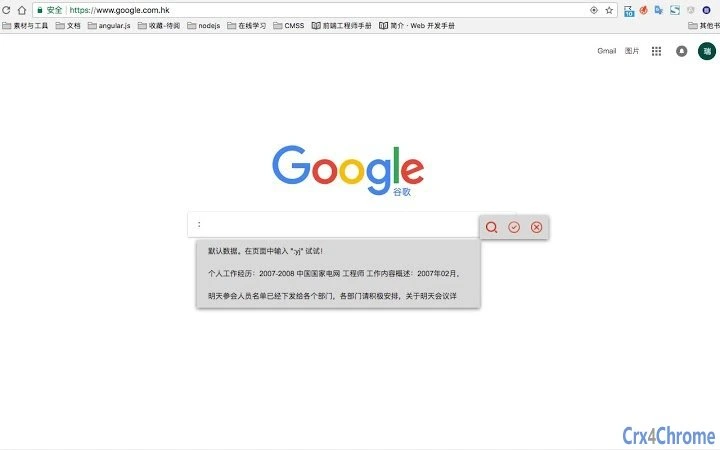

Smart Form Template Assistant
Smart Form Template Assistant is a productivity-focused desktop application designed to streamline repetitive form-filling tasks. It targets professionals, students, and job seekers who frequently encounter similar data entry scenarios—such as submitting multiple job applications during graduation season. The software enables users to save commonly used information as reusable templates, assigning each segment a short keyword for quick access.
By typing :keyword in any input field, users can instantly insert pre-saved content, eliminating the need to copy-paste from external documents like Word files. This approach reduces manual effort, minimizes errors, and accelerates workflow efficiency. The tool is particularly useful for users managing high-volume form submissions with recurring personal or professional details.
Its intuitive design supports rapid setup and seamless integration into daily tasks. The developer, SoftPas, has focused on creating a lightweight, user-centric solution for real-world data entry challenges. The application is available at no cost, making it accessible to a broad audience seeking time-saving tools.
It operates as a standalone desktop utility, ensuring privacy and offline functionality.
Key Features & Capabilities
- Template-Based Data Storage: Users can save repeated form entries—such as name, address, education history, or work experience—as structured templates. Each template can contain multiple fields with associated keywords for retrieval.
- Keyword-Based Auto-Insertion: By typing
:keywordin any text input field, the software automatically replaces the text with the corresponding saved content. This feature supports fast, accurate data entry without switching applications. - Customizable Keywords: Users define short, memorable keywords (e.g.,
:name,:edu) for each data segment, enabling quick recall and reducing cognitive load during form filling. - Offline Operation: The application functions without internet access, ensuring privacy and consistent performance regardless of connectivity.
- Lightweight Design: At just 10.5 MB, the software requires minimal system resources, making it suitable for use on a wide range of devices.
For example, a job seeker can create a template with fields like :name, :email, :resume_summary, and :skills. When applying to a new position, they simply type :name in the name field, and the full name is inserted instantly. This eliminates redundant copying from documents and reduces the risk of typos.
The system supports multiple templates, allowing users to organize data by purpose—job applications, academic forms, or personal profiles. The workflow is designed to be intuitive, requiring no technical setup. Users can begin saving and retrieving data within minutes of installation.
User Interface, Workflow & Performance
The application features a clean, minimal interface focused on core functionality. The main window displays a list of saved templates, with options to add, edit, or delete entries. Each template includes a name, associated keywords, and field-specific content.
Navigation is straightforward, using a sidebar for template management and a central panel for editing or viewing data. The workflow begins with creating a template, assigning keywords to specific fields, and saving it. Subsequent form filling is initiated by typing :keyword in any input field, where the software detects and replaces the text in real time.
The interface does not include complex dashboards or visualizations, which aligns with its purpose as a focused utility.
Performance details were not specified by the developer. However, given its lightweight size and desktop-native operation, the software is expected to run efficiently on modern systems. The developer did not provide additional system requirements.
General software behavior patterns suggest low CPU and RAM usage during active use. Stability is assumed to be consistent, as the application operates in a single-threaded, non-resource-intensive manner. No external dependencies were noted.
The software does not require background processes or constant monitoring, minimizing impact on system performance.
Compatibility & System Requirements
Smart Form Template Assistant is compatible with both Windows and Mac operating systems. The software is available in version 1.0 and has a file size of 10.5 MB. It is designed for desktop use and does not require a web browser or cloud connection to function.
The developer did not specify exact system requirements, including minimum CPU, RAM, or disk space. Compatibility information was partially provided, indicating support for major desktop platforms. No mobile or tablet versions were mentioned.
The application does not rely on external plugins or third-party services, ensuring broad compatibility across standard desktop environments. Users should verify that their system meets general desktop application standards for installation and execution.
Pros and Cons
Pros
- Free to use with no hidden costs
- Lightweight at only 10.5 MB
- Simple, intuitive interface for quick adoption
- Offline functionality ensures data privacy
- Efficient keyword-based auto-insertion reduces repetitive typing
- Supports multiple templates for organized data management
Cons
- No information provided about system requirements
- Exact performance metrics were not specified
- Only desktop versions available; no mobile support
- Limited to text-based input fields
- No built-in backup or sync feature across devices
FAQ Section
Is Smart Form Template Assistant available for both Windows and Mac?
Yes, the software is compatible with both Windows and Mac operating systems.
Can I use this tool without an internet connection?
Yes, the application operates entirely offline, ensuring your data remains private and accessible at all times.
Does the software require a license or subscription?
No, Smart Form Template Assistant is free to use with no licensing or subscription fees.
How do I update the software?
Updates are likely delivered through the official download page. Users should check for the latest version periodically to ensure they have the most recent release.
Can I use this tool for forms that require special characters or formatting?
The software supports standard text insertion. For forms requiring specific formatting or special characters, the saved content will retain its original format as long as it is correctly stored in the template.
Final Thoughts + CTA
Smart Form Template Assistant delivers a focused, efficient solution for users overwhelmed by repetitive form-filling tasks. Its core strength lies in the simplicity of keyword-based auto-insertion, which drastically cuts down on manual input time and reduces errors. The tool is especially valuable during high-volume periods like job applications, where consistency and speed are critical.
With no cost, a minimal footprint, and offline operation, it stands out as a practical choice for students, job seekers, and professionals. While detailed system requirements and performance data are not available, the application’s lightweight design and desktop-first approach suggest broad compatibility and stable performance. The lack of cross-device sync and mobile support are notable limitations, but they are balanced by strong privacy and ease of use.
For anyone looking to reclaim time and reduce friction in daily data entry, this tool is a compelling option. Download Smart Form Template Assistant now.







